I have to really wonder if the continuing Shoutcast problem in Streamtuner is in fact caused by the Ubuntu kernel.
I ask this question out loud after installing Vector Linux which is based on Slackware using Linux Kernel version 2.6.27.12
After I installed Vector Linux on an older 1 Ghz computer I saw that Streamtuner was preinstalled. Curious as to whether it would work properly or not I fired it up.
To my surprise, not only did the Shoutcast tab work perfectly but Punkcast and basic.ch plugins were installed and working properly.
Now it is possible that the good people involved with Vector Linux may have patched the plugin or it may be the latest Streamtuner release works as it should in Vector while still causing problems in Ubuntu.
I've also read that other distros don't have problems with the Streamtuner Shoutcast plugin that was recently released.
Yet it seems most Ubuntu users are still having problems with it.
I plan to take a look at the Vector install and the plugin they are using in an attempt to put this to rest once and for all.
I like Streamtuner and have not found anything that compares to it. So I'm not going to give up the fight to get this fixed properly.
TaZ
Showing posts with label Shoutcast. Show all posts
Showing posts with label Shoutcast. Show all posts
Monday, July 20, 2009


Wednesday, October 22, 2008
Shoutcast Bug In Streamtuner
So last week I fired up Streamtuner. It's been awhile since I have used it to listen to online music now that I have been using Songbird, so I was a bit upset when I couldn't get any listings for the Shoutcast feed.
At first I thought there was a glitch with their server but after a few days of checking it, I found it was still not working.
So I went digging.
Turns out that Shoutcast changed their website. The old Streamtuner plug-in doesn't work with the new design. What needed to be done was to fire up a hex editor and update the plug-in. But not an update that would use their new site feed. Nope! That would require a full rewrite of the plug-in code.
What I did was to find the Shoutcast address in the plug-in and change it to the new address that points to the old site that Shoutcast is maintaining.
Here's what you need to do in order to fix the Shoutcast plug-in.
Fire up your favorite hex editor and use it to open up the shoutcast.so plug-in found in usr/lib/streamtuner/plugins.
Now search for the two instances of www.shoutcast.com and replace them with 205.188.234.120 making sure you keep the spacing sane.
Now save it back into your folder.
Open up Streamtuner and go to the Shoutcast tab. You should now see your listings. If your don't just click on the Reload button.
For those of you who are saying that you don't know how to use a hex editor, no worries.
Here is a link to the patched shoutcast plug-in.
Download Plugin
Copy the plug-in, go to usr/lib/streamtuner/plugins folder. Open it as Root. Delete the existing shoutcast.so file and paste this patched file in to the folder.
Now open up Streamtuner, go to the Shoutcast tab and your listings should show up.
This is only a quick fix as it doesn't allow Streamtuner to access the new Shoutcast site and categories. Streamtuner itself needs to be fixed. I believe the original designer quit the project several years ago as there haven't been any updated versions. But I do believe there are some people maintaining it and hopefully they will release a newer 'fixed' version.
Update!!!
Thanks to Ernie for this easy fix that offers more functionality.
An alternative solution can be to edit your hosts file (/etc/hosts) and add the following line:
205.188.234.120 www.shoutcast.com
That overrides the shoutcast.com ip address provided by the DNS. It fixes the issue and you can access the webpage from the browser too.
Thanks again Ernie!
Enjoy!
TaZMAn
At first I thought there was a glitch with their server but after a few days of checking it, I found it was still not working.
So I went digging.
Turns out that Shoutcast changed their website. The old Streamtuner plug-in doesn't work with the new design. What needed to be done was to fire up a hex editor and update the plug-in. But not an update that would use their new site feed. Nope! That would require a full rewrite of the plug-in code.
What I did was to find the Shoutcast address in the plug-in and change it to the new address that points to the old site that Shoutcast is maintaining.
Here's what you need to do in order to fix the Shoutcast plug-in.
Fire up your favorite hex editor and use it to open up the shoutcast.so plug-in found in usr/lib/streamtuner/plugins.
Now search for the two instances of www.shoutcast.com and replace them with 205.188.234.120 making sure you keep the spacing sane.
Now save it back into your folder.
Open up Streamtuner and go to the Shoutcast tab. You should now see your listings. If your don't just click on the Reload button.
For those of you who are saying that you don't know how to use a hex editor, no worries.
Here is a link to the patched shoutcast plug-in.
Download Plugin
Copy the plug-in, go to usr/lib/streamtuner/plugins folder. Open it as Root. Delete the existing shoutcast.so file and paste this patched file in to the folder.
Now open up Streamtuner, go to the Shoutcast tab and your listings should show up.
This is only a quick fix as it doesn't allow Streamtuner to access the new Shoutcast site and categories. Streamtuner itself needs to be fixed. I believe the original designer quit the project several years ago as there haven't been any updated versions. But I do believe there are some people maintaining it and hopefully they will release a newer 'fixed' version.
Update!!!
Thanks to Ernie for this easy fix that offers more functionality.
An alternative solution can be to edit your hosts file (/etc/hosts) and add the following line:
205.188.234.120 www.shoutcast.com
That overrides the shoutcast.com ip address provided by the DNS. It fixes the issue and you can access the webpage from the browser too.
Thanks again Ernie!
Enjoy!
TaZMAn
Friday, September 26, 2008
Songbird Music and Web Browser
If your into music like I am, then this app may be perfect for you.
I'm not usually into integrated software apps but Songbird caught my eye.
Based on the Mozilla Firefox browser, it combines a browser, Shoutcast radio, Last FM, playlists and integrates your music library into a easily searchable database.
It also has a small but growing list of add-ons.
Even Flash is supported although it needs to be installed with the copy and paste technique.
Other add-ons include Album Art, mashTape, LyricMaster, iTunes Importer and more!
Add to this a fully functional Firefox clone browser and you have an excellent all in one package.
Oh! Did I mention it's available for Linux, Windows and Mac's!!
Although it is listed in the Synaptic package manager I strongly urge you to get it from the following links as the version in Synaptic is old and doesn't support Shoutcast and many other features.
If you are using Gutsy or earlier versions of Ubuntu you can get version 0.6.1 from Getdeb by going to the link below;
Download from Getdeb
The newer versions for Hardy and other OS's can be downloaded from
the Songbird home page found at link below;
Songbird Download
To install the Flash plugin for Songbird you can find instructions on how to do it from the Help page link below;
Install Flash
Finally, here is a screen shot of Songbird.
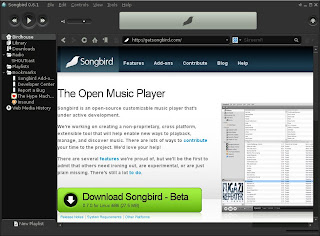
Enjoy and happy surfing with the music.
TaZMAn
I'm not usually into integrated software apps but Songbird caught my eye.
Based on the Mozilla Firefox browser, it combines a browser, Shoutcast radio, Last FM, playlists and integrates your music library into a easily searchable database.
It also has a small but growing list of add-ons.
Even Flash is supported although it needs to be installed with the copy and paste technique.
Other add-ons include Album Art, mashTape, LyricMaster, iTunes Importer and more!
Add to this a fully functional Firefox clone browser and you have an excellent all in one package.
Oh! Did I mention it's available for Linux, Windows and Mac's!!
Although it is listed in the Synaptic package manager I strongly urge you to get it from the following links as the version in Synaptic is old and doesn't support Shoutcast and many other features.
If you are using Gutsy or earlier versions of Ubuntu you can get version 0.6.1 from Getdeb by going to the link below;
Download from Getdeb
The newer versions for Hardy and other OS's can be downloaded from
the Songbird home page found at link below;
Songbird Download
To install the Flash plugin for Songbird you can find instructions on how to do it from the Help page link below;
Install Flash
Finally, here is a screen shot of Songbird.

Enjoy and happy surfing with the music.
TaZMAn
Subscribe to:
Posts (Atom)

 Posts
Posts


