Plex can't find my files!
This is a common complaint with Linux users and
many fixes aren't so easy.
Until now.
Mount your media drives so they can be accessed by Plex in a few simple steps.
After hours of wading through posts of how to get Plex to recognize your media drives I have come up with a simple solution that does not require changing your fstab file or changing permissions of your drive.
It also doesn't require you to change the user to root in the Plex config file. Instead I will show you how to change permissions of the folder where your hard drives are mounted.
This tutorial assumes that your hard drives are mounted in file system/media/(User Name) folder.
If your drives are mounted in a different folder then use that path with these instructions.
First we need to mount you hard drive(s) that contain your movie / tv files.
Next open the file system folder. You do this by clicking on File System in the side bar of your file browser.
Now right click on a blank area of that screen and select "Open as Administrator"
Enter your password in the permissions box.
A new window will open up. You are now in the File System folder and have root permissions.
Right click on the media folder and select Properties.
From the Properties window select the Permissions tab at the top.
Change the Owner to your user name. Change folder access to Create and Delete files.
Next change Group to your user name and in the Folder Access area change it to Access Files.
Under Others change Folder Access to Access Files.
Now click on Apply Permissions to Enclosed files.
Double click on the media folder to open it.
You will see a folder with your user name.
Do the same as you did above using the same steps.
When finished close the file browser windows.
Unmount you hard drives and restart your pc or you can use the following command to restart the Plex Media service;
sudo service plexmediaserver restart
Now mount your hard drive(s)
Open Plex and have it scan your media drive(s).
It should now recognize the drive and files and add them to your library.
Enjoy and hope this was helpful.
TaZ
Showing posts with label Library. Show all posts
Showing posts with label Library. Show all posts
Wednesday, May 22, 2019


Friday, September 26, 2008
Songbird Music and Web Browser
If your into music like I am, then this app may be perfect for you.
I'm not usually into integrated software apps but Songbird caught my eye.
Based on the Mozilla Firefox browser, it combines a browser, Shoutcast radio, Last FM, playlists and integrates your music library into a easily searchable database.
It also has a small but growing list of add-ons.
Even Flash is supported although it needs to be installed with the copy and paste technique.
Other add-ons include Album Art, mashTape, LyricMaster, iTunes Importer and more!
Add to this a fully functional Firefox clone browser and you have an excellent all in one package.
Oh! Did I mention it's available for Linux, Windows and Mac's!!
Although it is listed in the Synaptic package manager I strongly urge you to get it from the following links as the version in Synaptic is old and doesn't support Shoutcast and many other features.
If you are using Gutsy or earlier versions of Ubuntu you can get version 0.6.1 from Getdeb by going to the link below;
Download from Getdeb
The newer versions for Hardy and other OS's can be downloaded from
the Songbird home page found at link below;
Songbird Download
To install the Flash plugin for Songbird you can find instructions on how to do it from the Help page link below;
Install Flash
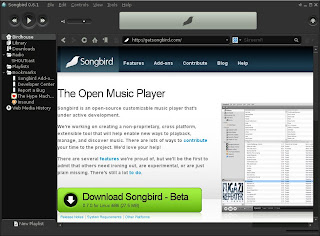
Finally, here is a screen shot of Songbird.
Enjoy and happy surfing with the music.
TaZMAn
I'm not usually into integrated software apps but Songbird caught my eye.
Based on the Mozilla Firefox browser, it combines a browser, Shoutcast radio, Last FM, playlists and integrates your music library into a easily searchable database.
It also has a small but growing list of add-ons.
Even Flash is supported although it needs to be installed with the copy and paste technique.
Other add-ons include Album Art, mashTape, LyricMaster, iTunes Importer and more!
Add to this a fully functional Firefox clone browser and you have an excellent all in one package.
Oh! Did I mention it's available for Linux, Windows and Mac's!!
Although it is listed in the Synaptic package manager I strongly urge you to get it from the following links as the version in Synaptic is old and doesn't support Shoutcast and many other features.
If you are using Gutsy or earlier versions of Ubuntu you can get version 0.6.1 from Getdeb by going to the link below;
Download from Getdeb
The newer versions for Hardy and other OS's can be downloaded from
the Songbird home page found at link below;
Songbird Download
To install the Flash plugin for Songbird you can find instructions on how to do it from the Help page link below;
Install Flash
Finally, here is a screen shot of Songbird.

Enjoy and happy surfing with the music.
TaZMAn
Subscribe to:
Posts (Atom)

 Posts
Posts


