Your not going crazy. This post is not about Linux or any other OS.
It's about I need your help or maybe I'm going crazy.
Back in the day, the Beatles songs were all over the airwaves. Every radio station was playing them. And one song sticks out in my mind because I can't find it or any info about it. That being Yellow Submarine by the Beatles.
But not the versions I keep coming across. I'm not that crazy or dense! LOL!!
The version I remember sounded like all the others I came across except for one part.
In the easily found version there is a part where you hear the sub noises and crew talking through the intercom with the final words of Tip it! Tip it!
The version that was played over the radio and on the juke boxes in my area had the words Dive! Dive!
Now I don't know if that was some kind of local area remix or if we have had the originals polluted by re-issues and re-masters and I haven't come across the true original?
So I am asking for your help. If anyone knows what album or release that version of Yellow Submarine is from, I sure would appreciate a shout in the comments section.
And thanks to any who can help me.
Showing posts with label Music. Show all posts
Showing posts with label Music. Show all posts
Friday, September 25, 2009


Wednesday, October 22, 2008
Shoutcast Bug In Streamtuner
So last week I fired up Streamtuner. It's been awhile since I have used it to listen to online music now that I have been using Songbird, so I was a bit upset when I couldn't get any listings for the Shoutcast feed.
At first I thought there was a glitch with their server but after a few days of checking it, I found it was still not working.
So I went digging.
Turns out that Shoutcast changed their website. The old Streamtuner plug-in doesn't work with the new design. What needed to be done was to fire up a hex editor and update the plug-in. But not an update that would use their new site feed. Nope! That would require a full rewrite of the plug-in code.
What I did was to find the Shoutcast address in the plug-in and change it to the new address that points to the old site that Shoutcast is maintaining.
Here's what you need to do in order to fix the Shoutcast plug-in.
Fire up your favorite hex editor and use it to open up the shoutcast.so plug-in found in usr/lib/streamtuner/plugins.
Now search for the two instances of www.shoutcast.com and replace them with 205.188.234.120 making sure you keep the spacing sane.
Now save it back into your folder.
Open up Streamtuner and go to the Shoutcast tab. You should now see your listings. If your don't just click on the Reload button.
For those of you who are saying that you don't know how to use a hex editor, no worries.
Here is a link to the patched shoutcast plug-in.
Download Plugin
Copy the plug-in, go to usr/lib/streamtuner/plugins folder. Open it as Root. Delete the existing shoutcast.so file and paste this patched file in to the folder.
Now open up Streamtuner, go to the Shoutcast tab and your listings should show up.
This is only a quick fix as it doesn't allow Streamtuner to access the new Shoutcast site and categories. Streamtuner itself needs to be fixed. I believe the original designer quit the project several years ago as there haven't been any updated versions. But I do believe there are some people maintaining it and hopefully they will release a newer 'fixed' version.
Update!!!
Thanks to Ernie for this easy fix that offers more functionality.
An alternative solution can be to edit your hosts file (/etc/hosts) and add the following line:
205.188.234.120 www.shoutcast.com
That overrides the shoutcast.com ip address provided by the DNS. It fixes the issue and you can access the webpage from the browser too.
Thanks again Ernie!
Enjoy!
TaZMAn
At first I thought there was a glitch with their server but after a few days of checking it, I found it was still not working.
So I went digging.
Turns out that Shoutcast changed their website. The old Streamtuner plug-in doesn't work with the new design. What needed to be done was to fire up a hex editor and update the plug-in. But not an update that would use their new site feed. Nope! That would require a full rewrite of the plug-in code.
What I did was to find the Shoutcast address in the plug-in and change it to the new address that points to the old site that Shoutcast is maintaining.
Here's what you need to do in order to fix the Shoutcast plug-in.
Fire up your favorite hex editor and use it to open up the shoutcast.so plug-in found in usr/lib/streamtuner/plugins.
Now search for the two instances of www.shoutcast.com and replace them with 205.188.234.120 making sure you keep the spacing sane.
Now save it back into your folder.
Open up Streamtuner and go to the Shoutcast tab. You should now see your listings. If your don't just click on the Reload button.
For those of you who are saying that you don't know how to use a hex editor, no worries.
Here is a link to the patched shoutcast plug-in.
Download Plugin
Copy the plug-in, go to usr/lib/streamtuner/plugins folder. Open it as Root. Delete the existing shoutcast.so file and paste this patched file in to the folder.
Now open up Streamtuner, go to the Shoutcast tab and your listings should show up.
This is only a quick fix as it doesn't allow Streamtuner to access the new Shoutcast site and categories. Streamtuner itself needs to be fixed. I believe the original designer quit the project several years ago as there haven't been any updated versions. But I do believe there are some people maintaining it and hopefully they will release a newer 'fixed' version.
Update!!!
Thanks to Ernie for this easy fix that offers more functionality.
An alternative solution can be to edit your hosts file (/etc/hosts) and add the following line:
205.188.234.120 www.shoutcast.com
That overrides the shoutcast.com ip address provided by the DNS. It fixes the issue and you can access the webpage from the browser too.
Thanks again Ernie!
Enjoy!
TaZMAn
Friday, September 26, 2008
Songbird Music and Web Browser
If your into music like I am, then this app may be perfect for you.
I'm not usually into integrated software apps but Songbird caught my eye.
Based on the Mozilla Firefox browser, it combines a browser, Shoutcast radio, Last FM, playlists and integrates your music library into a easily searchable database.
It also has a small but growing list of add-ons.
Even Flash is supported although it needs to be installed with the copy and paste technique.
Other add-ons include Album Art, mashTape, LyricMaster, iTunes Importer and more!
Add to this a fully functional Firefox clone browser and you have an excellent all in one package.
Oh! Did I mention it's available for Linux, Windows and Mac's!!
Although it is listed in the Synaptic package manager I strongly urge you to get it from the following links as the version in Synaptic is old and doesn't support Shoutcast and many other features.
If you are using Gutsy or earlier versions of Ubuntu you can get version 0.6.1 from Getdeb by going to the link below;
Download from Getdeb
The newer versions for Hardy and other OS's can be downloaded from
the Songbird home page found at link below;
Songbird Download
To install the Flash plugin for Songbird you can find instructions on how to do it from the Help page link below;
Install Flash
Finally, here is a screen shot of Songbird.
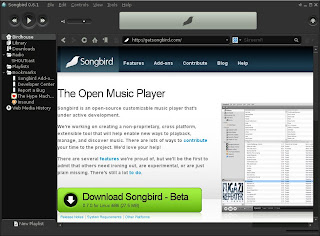
Enjoy and happy surfing with the music.
TaZMAn
I'm not usually into integrated software apps but Songbird caught my eye.
Based on the Mozilla Firefox browser, it combines a browser, Shoutcast radio, Last FM, playlists and integrates your music library into a easily searchable database.
It also has a small but growing list of add-ons.
Even Flash is supported although it needs to be installed with the copy and paste technique.
Other add-ons include Album Art, mashTape, LyricMaster, iTunes Importer and more!
Add to this a fully functional Firefox clone browser and you have an excellent all in one package.
Oh! Did I mention it's available for Linux, Windows and Mac's!!
Although it is listed in the Synaptic package manager I strongly urge you to get it from the following links as the version in Synaptic is old and doesn't support Shoutcast and many other features.
If you are using Gutsy or earlier versions of Ubuntu you can get version 0.6.1 from Getdeb by going to the link below;
Download from Getdeb
The newer versions for Hardy and other OS's can be downloaded from
the Songbird home page found at link below;
Songbird Download
To install the Flash plugin for Songbird you can find instructions on how to do it from the Help page link below;
Install Flash
Finally, here is a screen shot of Songbird.

Enjoy and happy surfing with the music.
TaZMAn
Subscribe to:
Posts (Atom)

 Posts
Posts


